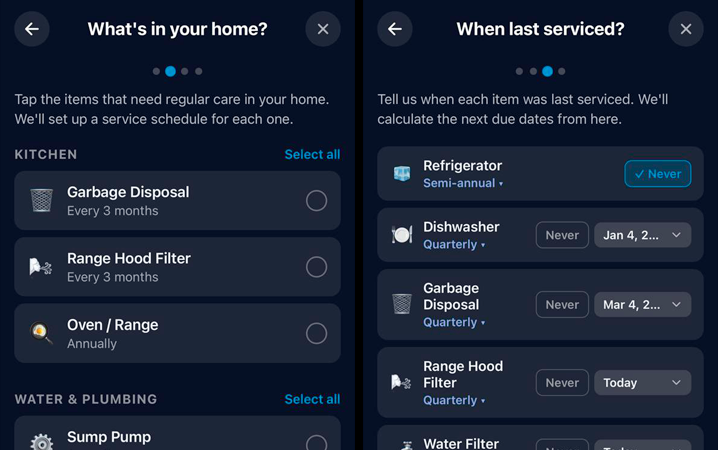
When you first sign up, Nestly walks you through a quick 4-step setup designed to get your home's service record started without any blank-slate friction.
Step 1 — Welcome. A brief intro to the app's core idea: your home, organized by item.
Step 2 — Pick your items. Choose from a curated list of common home items, grouped into 6 categories: HVAC & Climate, Kitchen, Water & Plumbing, Safety & Security, Exterior & Structure, and Appliances & Other. Each preset comes with a sensible default service schedule already attached — for example, selecting "Air Filter" automatically sets up a monthly replacement reminder, and "HVAC System" comes with an annual service schedule. You can adjust the recurrence for any item before moving on.
Step 3 — Last service dates. For each item you selected, tell us when it was last serviced (or "never"). Nestly uses this to calculate realistic first due dates so your schedule starts accurate from day one — not offset by months.
Step 4 — Summary. Review your selections and confirm. All items and their service schedules are created at once in your first household. You land on the Dashboard with a populated timeline, ready to use.
Re-running onboarding: If you've already set up your home, you can re-open onboarding from Setup → Show Onboarding at any time. Items you've already added are filtered out, so you can use it to add new items without creating duplicates.